Packaging, holograms and labels can all be copied. A fake bottle of shampoo or a fake phone charger can look exactly like the real one on a shop shelf or in an online listing. What a counterfeiter cannot easily copy is the brand's own record of which codes it printed. That is what a product authentication QR code checks, and it takes a few seconds with AsliScan.
Why a QR code on the pack is not proof by itself
Anyone can print a QR code. An ordinary code simply opens whatever link the person who printed it chose, so a fake product can carry a code that opens a fake "verified" page. What matters is where the code is checked.
Brands that protect their products with QRAuthix register every code on their packs. When you scan one of those codes with AsliScan, the app checks it live against the brand's QRAuthix records and tells you whether it matches.
Step 1: Install AsliScan
AsliScan, powered by QRAuthix, is free on Google Play. There is no account to create and nothing to buy before you can scan.
Step 2: Look at the QR code before you scan it
- Make sure the code is not covered by a sticker. A sticker over the original code is a common trick.
- Flatten the label if it is creased, and wipe off any dust or moisture.
- Note the code printed under the QR label, in case the camera cannot read it.
Step 3: Scan the code
Tap Open Scanner Camera on the AsliScan home screen and hold the code inside the frame. In low light, turn on the flashlight. If the camera still cannot read it, choose Enter Code Manually and type the printed code.
Step 4: Read the result
If the code matches the brand's records, AsliScan shows Verified — Genuine Product with the product name, brand, batch, the time of verification and a verification ID you can copy. Check that the product name and brand match what is in your hand.
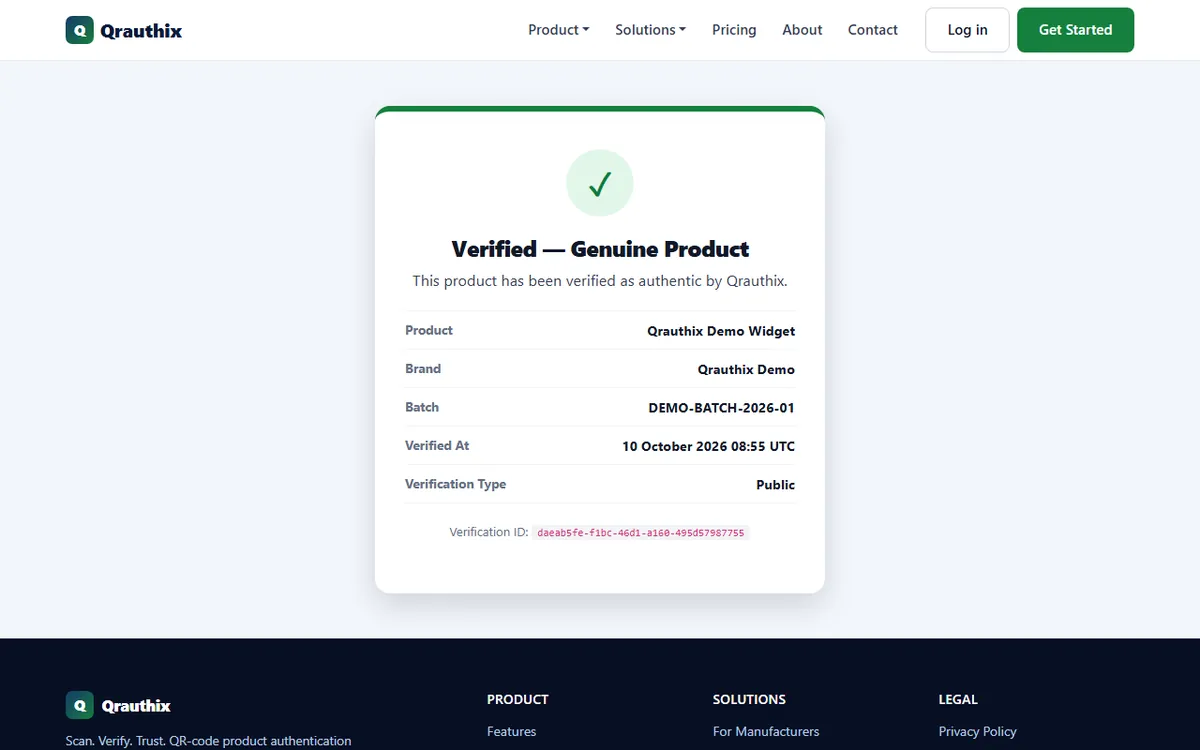
If the check fails, AsliScan tells you why: the code may be inactive, expired, already used or not recognised. Whatever the reason, do not treat the product as genuine. Contact the brand, or the seller you bought it from.
Simple QR and Secure QR codes
QRAuthix brands can print two kinds of code:
- Simple QR codes can be checked with any phone camera. They open a verification page, and genuine verification pages always open on qrauthix.com. If the address is different, be suspicious.
- Secure QR codes, used on higher-value products, can only be verified inside AsliScan. Each scan completes a one-time check with QRAuthix, so a photo or copy of the code cannot be reused to fake a result.
Step 5: Share or keep the result
You can share a verification result with family, friends or the seller in one tap, or copy the verification ID if the brand asks for it. Your recent scans stay on the AsliScan home screen, and you can clear them at any time.
Your privacy
AsliScan does not need an account. Location is optional: if you allow it, your approximate location is saved with the verification so brands can spot a copied code being scanned far from where the real product could be.
Quick checklist
- No sticker over the QR code, and the label is not damaged
- Scanned with AsliScan, or the printed code entered manually
- Result says Verified — Genuine Product
- Product name, brand and batch match the pack
- Any failed result reported to the brand or seller
Scanning QR codes in public places too? Read 7 tips to scan QR codes safely, or see why AsliScan works as a free QR code scanner app for everyday codes. If you are a brand and want customers to see your products as verified, see QRAuthix.
Frequently asked questions
Is AsliScan free?
Yes. AsliScan is free to download and use. There is no sign-up and no in-app purchase needed to scan or verify.
Is AsliScan available on iPhone?
Not yet. AsliScan is currently available for Android on Google Play.
What if the camera cannot read the QR code?
Choose Enter Code Manually in AsliScan and type the code printed under the QR label.
Can I check every product with AsliScan?
AsliScan can verify products whose brands protect them with QRAuthix. For any other QR code, it shows what the code contains, so you can decide whether to open it.
Does AsliScan need my location?
No. Location is optional. If you allow it, your approximate location is saved with the verification to help brands spot copied codes being scanned far from where the real product could be.